MBTA Go — Official
- 3.7
- Rating
- 50.00K
- Installs
- Free
- Price

 Analysis by App-foxy
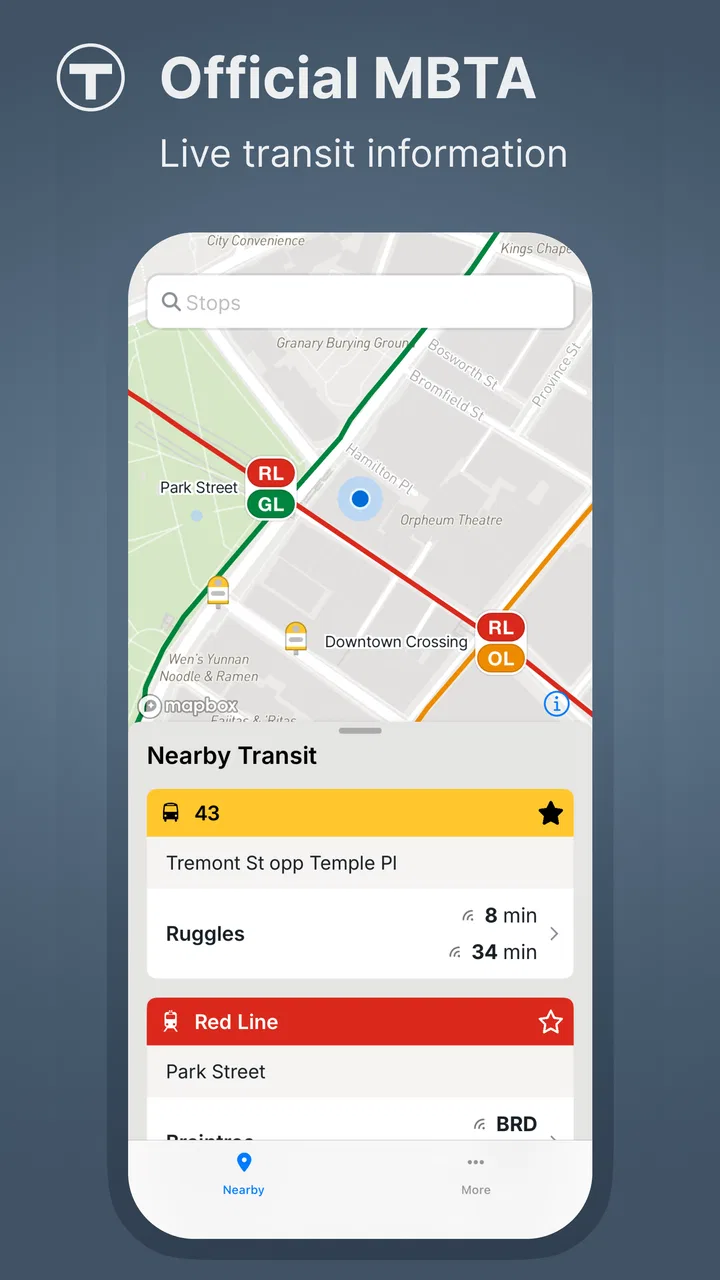
For anyone moving around Greater Boston by bus, subway, ferry, or commuter rail, the first challenge is often not choosing a route but finding trustworthy information at the moment it matters. MBTA Go — Official is built for that situation. It is a free Maps & Navigation app from MBTA, focused on live public transit information in the Greater Boston area rather than trying to be an all-purpose travel planner for every city.
I found its strongest appeal in the way it keeps the transit question narrow and practical: what is happening on the MBTA network, and what should I check before I leave? That makes it especially useful for a first-time visitor, a daily rider who wants an official reference, or anyone standing at a stop and needing current information. It is available for Everyone, has passed the early adoption stage with over fifty thousand installs, and its average rating sits at 3.7 from around a hundred ratings. Those figures suggest a useful but still developing app, not a universally polished replacement for every navigation tool.
What to expect before your first trip
The most important expectation to set is that this is an official transit companion, not a general-purpose map with every possible travel option layered on top. MBTA Go is designed around the Greater Boston public transportation network, so its value comes from staying close to that system. If your trip depends on MBTA service, opening the official app can be more relevant than beginning with a broad mapping app that treats public transit as only one of many choices.
You May Also Like

 Blood Strike: 2.5 Anniversary
Blood Strike’s Loadouts Turn Every Drop Into a Tactical Gamble
A close look at Blood Strike’s custom loadouts: how fast access to signature weapons reshapes its battle royale rhythm, rewards preparation, and narrows the gap between fights.

 Pandora - Music & Podcasts
Pandora’s Music Is Easy to Start, but Harder to Recover
Pandora’s strength is its low-effort path from a seed to a station. Its weak spot is how much confidence it asks you to place in connection, setup, and quiet recovery.

 8 Ball Pool
 Is Built on Rivalries, Rematches, and Routine
A close look at the rivalries, rematches, shared routines, and unanswered safety questions that turn a quick pool match into a persistent mobile community.

 Samsung Music
’s Quiet Strength Is Playing What You Already Own
Its reach comes less from spectacle than from dependable access to a personal library. That simplicity is both the app’s strongest retention engine and its ceiling.

 AccuWeather: Weather Radar
AccuWeather Review: A Quick, Clear Forecast for Everyday Decisions
For everyday plans, the best forecast is the one you can understand quickly. AccuWeather makes rain timing, radar, and local conditions easy to act on, with a few trade-offs.

 Hill Climb Racing
Why Hill Climb Racing Still Turns Crashes Into One More Run
A tiny car, a bumpy hill and one more upgrade: Hill Climb Racing keeps resurfacing because its simple chaos makes every near-miss feel personal.
More From Our News Desk
View All News


That focus also defines its limits. I would not install it expecting a complete guide to walking routes, rideshare prices, restaurant locations, or transport systems outside the MBTA area. A general map remains more convenient when you are comparing driving, cycling, walking, and public transit together. MBTA Go makes more sense as the transit-specific tool you open when service status and current network information matter more than a wide list of destinations.
The app is free, which removes the usual hesitation about trying it before a busy commute. It was released on February 21, 2025, and the current version is 2.1.1, so I would approach it as a relatively young official product. That is not automatically a problem, but it helps explain why the experience may feel more functional than refined in places. MBTA is the developer, and the official source is a meaningful advantage when you want information tied directly to the agency rather than an interpretation assembled by a third party.
For a first-time user, the best mental model is simple: install it before you need it, open it when planning or checking an MBTA journey, and give yourself a moment to understand where the live information is presented. Do not wait until you are already late, underground, or standing in rain at an unfamiliar stop. The app is most useful when it becomes part of a small travel routine instead of an emergency download.
Who will get the most value
I would recommend it first to people who regularly use MBTA services and want an official place to check conditions. It is also a sensible choice for visitors staying in Boston who would rather learn one transit-focused app than depend entirely on a search result. Students, commuters, and occasional riders can all benefit, but their expectations differ: a regular rider may appreciate quick access to current network information, while an occasional rider will value reassurance before starting an unfamiliar trip.
The app is less compelling for someone who rarely travels by public transportation or whose journeys routinely cross several agencies. In that case, a broader navigation service may offer a smoother single-screen comparison. It is also not my first choice when the main question is how to get from a home address to a precise door using several transport modes. For those trips, I would use a general map for the overall journey and MBTA Go as the official transit check.
Setting it up without overthinking the process
Getting started is intentionally straightforward: install the free app, open it, and begin by identifying the part of the MBTA network relevant to your trip. I recommend doing this at home while connected to a reliable network, not for any complicated technical reason, but because the first launch is the right time to become familiar with the layout. A calm first look is much easier than learning the interface while a vehicle is approaching.
Before leaving, decide what you actually need from the app. Are you checking whether service is running normally? Are you looking for current information connected to a particular line or route? Or are you trying to confirm that your planned journey is still sensible? Starting with one question keeps the app from becoming another screen full of information. Transit apps can feel confusing when a rider opens them without knowing whether they are planning, monitoring, or troubleshooting.
I also suggest preparing a backup habit. Keep the destination and the relevant line in mind rather than relying on the app as your only memory aid. Live transit information can change while you are traveling, and a phone battery, signal, or crowded platform can make any app harder to use. MBTA Go is most reassuring when it supports your judgment, not when you expect it to remove every decision.
The app is intended for Everyone, which makes it approachable for households and mixed-age groups. That does not mean every rider will instantly understand every transit detail. A child, older relative, or visitor unfamiliar with Boston may still need help translating a line name or stop into a physical direction. I found that the most useful setup is to check the app together before departure, then explain the practical next step in plain language: which service to use, where to wait, and what change would cause you to reconsider the plan.
Your first meaningful success
The first successful action should be small and concrete: use MBTA Go to check the current situation for the service you intend to take, then compare that information with your actual departure plan. Do not begin by exploring every area of the app. Pick one journey you already understand, even if it is only a familiar ride across town. That gives you a reference point for judging whether the app is clear and useful.
Here is the everyday scenario I would use. Imagine leaving work near the end of the day with an appointment across Boston. Before walking to the station, I open the app and check the MBTA information connected to the service I expect to use. If the situation looks normal, I continue with my plan. If there is a disruption or delay, I have discovered it before committing to the walk, rather than learning about it after reaching the platform. That small change in timing is where an official transit app earns its place.
For a visitor, the same workflow is even more valuable. Start at the hotel or another quiet location, identify the MBTA service that appears to fit the outing, and use the app to verify the network information before heading out. Once you are moving, use it for confirmation rather than repeatedly rebuilding the entire trip. This reduces the chance of staring at your phone at every intersection and helps you pay attention to signs, station entrances, and the direction of travel.
A useful habit is to check twice: once before leaving and again if the journey takes an unexpected turn. The first check supports planning; the second supports adaptation. Those are different jobs, and treating them separately makes the experience less stressful. If the first check tells you the service is suitable, you still need to remain alert to later changes. Conversely, a confusing first screen does not necessarily mean the app is useless; it may simply mean you need to narrow the question to the specific service you are about to use.
Where first-time riders can get confused
The biggest source of confusion is likely to be the difference between live transit information and complete door-to-door navigation. An official MBTA app can tell you more about the transit network, but you still need to understand how that network connects to your starting point and destination. A rider may know the correct line yet enter the wrong station entrance, choose the wrong platform direction, or underestimate the walk at either end.
That is why I would not treat a favorable service update as a guarantee that the whole trip will be effortless. It confirms an important part of the journey, but it does not replace basic orientation. Before leaving, note the name of your destination stop and the direction you need. If you are changing services, keep that transfer in mind instead of assuming the app will make the physical connection obvious once you arrive.
Another common misunderstanding is expecting live information to behave like a fixed timetable. Transit conditions are dynamic, and a status check is a snapshot that helps you make a decision at that moment. If you spend a long time getting ready after checking, the information may no longer reflect what you will encounter. My practical rule is to check close enough to departure to be useful, while still leaving time to respond if the situation changes.
There is also a trade-off between official focus and broad convenience. A general navigation app may offer a more familiar map, richer walking guidance, and easier comparisons with driving or cycling. MBTA Go’s advantage is not that it replaces all of those tools; it is that it gives MBTA-related information its own dedicated space. I would use both when necessary rather than forcing one app to answer questions it was not designed to handle.
Three practical habits that make it more useful
- Check before committing to the walk. If the station is several minutes away, look at the relevant MBTA information first. This is especially helpful when rain, luggage, mobility needs, or a tight appointment makes an unnecessary walk costly.
- Use a familiar trip as a test. Your first session should not happen during an unfamiliar late-night journey. A known route lets you notice how the app presents information and makes it easier to spot what you still need to interpret yourself.
- Pair official information with physical orientation. Keep the stop name, travel direction, and transfer in mind. The app can support the decision, but signs and platform announcements still matter once you are moving through the system.
These habits reveal a useful trade-off. The more specific your question, the more helpful the app becomes. “What is happening with the MBTA service I plan to use?” is a strong question for it. “What is the best way to spend my afternoon and reach three unrelated places?” is better suited to a broader planning tool. Knowing that difference prevents disappointment and saves time.
How it compares with the usual alternatives
Compared with a general mapping app, MBTA Go has a clearer institutional focus. A broad map is excellent when you want one route that combines walking, transit, and other options, but its transit information can feel like one layer among many. The official MBTA app is the better first check when the reliability of MBTA-specific information is your main concern.
Compared with relying on station signs or announcements alone, the app lets you prepare before reaching the station. That is a real advantage for visitors and occasional riders who may not yet know which information to look for. On the other hand, station signage remains essential because it helps with the physical details of entering, transferring, and boarding. I see MBTA Go as preparation and confirmation, not a reason to ignore the environment around you.
Compared with third-party transit apps, the decision is more nuanced. A third-party service may have a more familiar interface or combine several agencies in one journey. That can be better for regional travel beyond the MBTA network. The official app is preferable when you want the agency’s own transit-focused reference and do not need a broad comparison of every transportation mode.
This is why I would keep it installed even if I already used another navigation app. The two tools answer different questions. The general app helps me understand the whole journey; MBTA Go gives me a focused place to verify the MBTA portion. For a daily rider, that separation can be more efficient than repeatedly searching the web. For a visitor, it provides a second source of confidence without requiring a complicated setup.
Performance, maturity, and realistic expectations
The current version, 2.1.1, shows that the app has already received updates beyond its initial release, but I would still judge it as a developing product rather than a fully mature travel platform. Its average rating of 3.7 indicates a mixed reception, so prospective users should be prepared for some friction depending on their expectations and device experience. I would not dismiss it on that basis, because transit usefulness can come from one dependable task even when the surrounding interface is not perfect.
The adoption level of over fifty thousand installs also places it in a practical middle ground. It is established enough to be relevant to real riders, yet not so widespread that every traveler will already know its workflow. That reinforces my advice to test it before an important trip. A few minutes of familiarization can tell you whether its presentation suits the way you plan journeys.
One limitation I would take seriously is dependence on context. The app is most valuable inside the Greater Boston transit environment. If you are planning a trip that moves between MBTA services and unrelated operators, or if you need extensive walking directions, you may have to switch tools. That is not a flaw so much as a boundary, but recognizing it early keeps the app from becoming frustrating.
I would also avoid judging the entire experience from a single rushed search. A transit app can seem unhelpful when the user is tired, the destination is unfamiliar, and the question is too broad. Try it first with a known MBTA journey, then with a simple upcoming trip. If it consistently helps you make a faster decision, it has earned a place in your travel routine. If you still need another app for every meaningful step, then the broader option may be a better primary tool for you.
My recommendation for a first-time user
My recommended path is to install MBTA Go before your next important ride, open it while you have time, and use a familiar MBTA journey as practice. Identify the service you plan to take, check the current information, and write down the practical details you still need to handle yourself: where you are starting, which direction matters, and where you will get off or change. Then repeat the check shortly before departure.
That workflow gives you a meaningful result quickly. You are not merely browsing an app; you are using it to decide whether to leave now, adjust your plan, or consult a broader navigation tool. For a commuter, it can become a quick pre-departure check. For a visitor, it can reduce the uncertainty of using Boston public transit without pretending that an app can replace attention to signs and surroundings.
I recommend it most strongly to MBTA riders who want an official, free transit reference dedicated to Greater Boston. I would be more cautious about making it the only travel app for complex regional journeys, multi-modal sightseeing, or trips where walking directions are just as important as transit status. In those cases, pair it with a general map rather than expecting MBTA Go to cover everything.
Overall, I see MBTA Go as a focused tool with a sensible purpose and some room to become smoother. Its best quality is not flashy extras but the confidence that comes from checking the MBTA network in an app made for that system. If your first goal is to know whether your planned MBTA ride is still a good idea, this is a practical app to try. It will not remove every transit decision, but it can help you make the important one before you are already on the way.
FAQs for MBTA Go — Official
01What is MBTA Go — Official, and what does it offer?
MBTA Go — Official is a mobile application designed to provide real-time information about public transportation in the Massachusetts Bay area. Users can access schedules, maps, and service alerts for buses, trains, and ferries. The app aims to enhance the commuting experience by offering detailed updates and customizable notifications.
02Is MBTA Go — Official available for both Android and iOS devices?
Yes, MBTA Go — Official is available for download on both Android and iOS platforms. Users can find it on the Google Play Store for Android devices and the App Store for iOS devices. The app is designed to be user-friendly and accessible to a wide range of mobile devices.
03Does MBTA Go — Official require an internet connection to function?
While some features of MBTA Go — Official can be accessed offline, such as saved schedules and maps, the app primarily requires an internet connection to provide real-time updates and service alerts. To make the most of its features, it's recommended to have a stable internet connection while using the app.
04Are there any costs associated with using MBTA Go — Official?
MBTA Go — Official is free to download and use. However, standard data charges may apply when using the app's online features, depending on your mobile service provider. The app itself does not require any subscription fees or in-app purchases to access its main functionalities.
05How does MBTA Go — Official handle user privacy and data security?
MBTA Go — Official is committed to protecting user privacy and data security. The app collects minimal personal data, primarily for improving user experience and providing personalized notifications. All data is stored securely, and users can review the privacy policy within the app to understand how their information is handled.
Pros
- Real-time updates for all transit lines.
- User-friendly interface with clear maps.
- Customizable notifications for routes.
- Accessible for people with disabilities.
- Offline mode for route planning.
Cons
- Occasional delays in update accuracy.
- Limited features for non-MBTA lines.
- Requires location permissions to function.
- No dark mode option available.
- Ads can be intrusive for free users.

MBTA Go — Official
Gallery